How to Increase Your Shopify Conversion Rate (Step-by-Step Guide for 2026)

You're spending money on ads. You're getting traffic. But your revenue isn't growing the way it should.
If that sounds familiar, the answer almost certainly lives in your conversion rate — and the good news is that improving it is one of the most measurable, high-leverage things you can do in your entire business.
This is the complete step-by-step guide to increasing your Shopify conversion rate in 2026. Every tactic here is proven, actionable, and grounded in real conversion psychology — not guesswork.
What Is Shopify Conversion Rate and Why Does It Matter?
Your Shopify conversion rate is the percentage of visitors who complete a purchase. If 1,000 people visit your store and 20 buy, your conversion rate is 2%.
Here's why this number matters more than almost any other metric in your business:
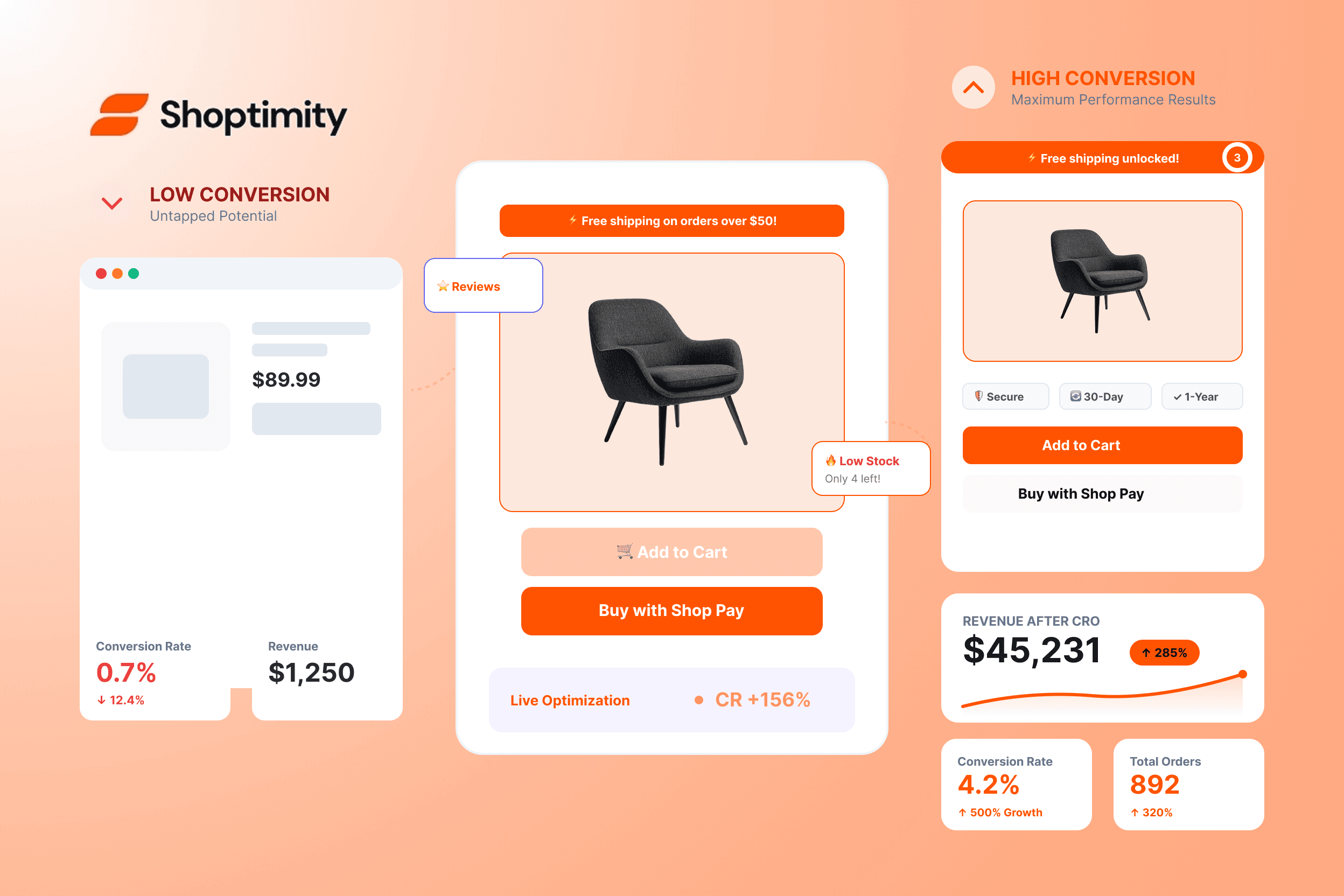
Conversion rate is a multiplier on everything else you do.
Same traffic. Same ad spend. Six times the revenue. That is the power of conversion rate optimisation.
The 10 Steps to a Higher Conversion Rate
Diagnose Before You Optimise
Before changing anything, understand exactly where visitors are dropping off. Optimising randomly is guesswork. Optimising based on data is a system. Check these metrics first in Google Analytics and Shopify:
- Bounce rate by page — which pages send people away immediately? High bounce on product pages means the page isn't delivering on what the ad promised.
- Add-to-cart rate — what share of visitors add anything to the cart? Under 5% points to a product-page problem; healthy add-to-cart but low checkout completion points to the cart and checkout flow.
- Cart abandonment rate — the industry average is 69.8%. Higher than that means friction in the cart-to-checkout journey.
- Mobile vs desktop conversion — if mobile converts at less than half your desktop rate, you have a mobile-experience problem costing real revenue.
- Top exit pages — leaving from product pages means the page is the issue; leaving from checkout means friction, trust, or shipping costs.
Once you know your numbers, every step below becomes a targeted fix rather than a shot in the dark.
Fix Your Page Speed First
Page speed is not a technical detail. It is a conversion factor.
Most common causes of slow Shopify stores:
- Too many apps running JavaScript on every page
- Unoptimised images (PNG instead of WebP, no lazy loading)
- Outdated theme code with legacy scripts
- Render-blocking scripts in the page header
- Too many third-party tracking pixels firing at once
How to fix it:
- Audit your apps ruthlessly — every app loads scripts on every page. If an app isn't actively making you money, uninstall it. Every app removed is page speed recovered.
- Convert images to WebP — 25–35% smaller than JPG/PNG with no visible quality loss.
- Switch to a performance-built theme — the single most impactful change. Shoptimity is built for speed: clean modern code, no legacy bloat, scoring 90+ on Google PageSpeed and loading under 2.5 seconds on mobile.
- Track monthly with Google PageSpeed Insights — target 90+ on mobile.
Rebuild Product Pages Around Conversion Psychology
Your product page is where the buying decision happens. Most Shopify product pages are built to display products. High-converting product pages are built to sell them. There is a significant difference.
Above the fold (what visitors see without scrolling):
- Hero product image — large, clear, professional
- Product name — clear and benefit-focused
- Price — visible, no hunting required
- Star rating and review count — social proof immediately visible
- Add-to-cart button — high-contrast, dominant, unmissable
- Short key benefits — 3–5 bullet points maximum
The trust zone (just below add-to-cart): money-back guarantee badge, secure-checkout badge, free-shipping threshold, and delivery-time estimate. This placement isn't arbitrary — purchase anxiety peaks at the moment of clicking "add to cart," and the trust zone reduces it at exactly the right moment.
Product description: write for your customer, not your product. Lead with the biggest benefit, not the specification. "Never worry about back pain during long drives" converts better than "Ergonomic lumbar support cushion with memory foam." Features tell. Benefits sell.
Social proof: reviews with photos, star ratings, and specific outcomes ("I lost 4kg in the first month" beats "Great product!"). Display 10–50+ reviews to signal legitimacy.
Shoptimity's product-page layouts are built around exactly this architecture — high-contrast CTAs, sticky add-to-cart on mobile, and trust signals positioned precisely where they reduce hesitation.
Make Your Mobile Experience Actually Work
Mobile conversion killers to fix immediately:
- Buttons too small to tap — anything under 44px height is friction. Make add-to-cart large and obvious.
- Text too small to read — minimum 16px body text on mobile. Non-negotiable.
- No sticky add-to-cart — a sticky bar at the bottom of the mobile screen keeps the buy action one tap away as customers scroll.
- Checkout with too many steps — enable Shop Pay and express checkout, and remove any non-essential field.
- Slow image loading — lazy-load below-fold images and serve WebP.
A mobile-first theme like Shoptimity is designed with every one of these baked in from the start — not patched on after the fact.
Reduce Cart Abandonment
Why people abandon (and how to fix each):
- Unexpected shipping costs (the #1 reason) — show shipping or "free shipping over $X" on the product page, never as a last-step surprise.
- Required account creation — always offer guest checkout; invite account creation after purchase.
- Complicated checkout — minimise form fields, enable autofill, use one-page checkout where possible.
- Payment method not available — offer UPI, cards, and COD for Indian audiences; add PayPal and Shop Pay internationally.
- No trust signals in checkout — display security badges, SSL indicators, and the return policy throughout.
- Abandoned-cart email sequence — three emails (1 hour, 24 hours, 72 hours) recover 5–15% of abandoned carts.
The cart drawer advantage: replacing the cart page with a cart drawer keeps customers in the buying flow. Instead of navigating away — breaking momentum — the drawer slides in over the current page: fewer steps, less distraction, more completed purchases. Shoptimity's built-in cart drawer is designed specifically to reduce this friction.
Add Upsells and Cross-Sells
This step doesn't directly raise your conversion rate — it raises your revenue per conversion. Since revenue per visitor is the ultimate metric, it belongs in every CRO playbook.
Where to put upsells:
- On the product page — "Frequently bought together" below the main product info. Keep it to 2–3 complementary products.
- In the cart drawer — "Add this for just $9 more" at the highest-intent moment, right before checkout.
- Post-purchase — on the order-confirmation page, when the card is already out. These offers can convert exceptionally well.
Shoptimity includes native upsell and cross-sell functionality built into the theme — no third-party app, no loading delay, no style mismatch.
Use Quantity Breaks to Boost AOV
Quantity breaks — "Buy 2, save 10%" or "Buy 3, get 1 free" — tap two powerful triggers: the desire to save money and the aversion to leaving value on the table. When a customer sees that two units save 10%, many rationalise buying more.
The key is placement — tiers must be visible on the product page, before the customer adds to cart, not buried in a pop-up after. Shoptimity renders quantity-break tiers natively on product pages, in the right position, without any app.
Build Trust at Every Touchpoint
Trust is the invisible conversion factor. Visitors constantly ask — consciously or not — "Is this store legitimate? Will I receive what I order? What if something goes wrong?" Every element either builds or erodes that trust.
Visual trust signals:
- SSL certificate — the padlock in the browser bar. Non-negotiable.
- Professional design — a polished store signals a real business; a template-looking store triggers doubt.
- Consistent branding — same fonts, colours, and tone throughout.
Social proof:
- Product reviews — minimum 10 per product before driving paid traffic, ideally 50+.
- Photo reviews — customers showing the product in real use are far more convincing than text alone.
- Review count — "4.8 stars (247 reviews)" builds more trust than "4.8 stars (3 reviews)."
Policy trust:
- Clear return policy — on product pages, not buried in the footer. "30-day returns, no questions asked" removes risk.
- Delivery transparency — "Delivered by [specific date]" beats a vague "7–14 days."
- Contact information — a real email, phone, or live chat signals a real business.
Run A/B Tests on Your Highest-Traffic Pages
Everything in this guide gives you a direction. A/B testing tells you what specifically works for your audience — run two versions of a page at once, split your traffic, and measure which converts better.
Start with these high-impact tests:
- Add-to-cart copy — "Add to Cart" vs "Buy Now" vs "Get Yours Today." Small copy changes can move conversion 1–3%.
- Product hero image — lifestyle (in use) vs clean background. Lifestyle often wins for fashion, fitness, and home.
- Price display — $19.99 vs $20.00 vs $20. Psychological pricing effects are real and measurable.
- CTA button colour — your button should contrast strongly with the page; test which draws the eye most.
- Trust-badge placement — below add-to-cart vs next to the price.
Use Shopify's native A/B testing or a free tool. Run each test for at least 2 weeks and 100+ conversions before drawing conclusions.
Optimise Your Store's Visual Design and Layout
This is perhaps the most underestimated CRO factor. Your store's visual design creates an immediate, subconscious judgement in every visitor's mind: "Is this store trustworthy and worth my money?"
What a high-converting store looks like:
- Clean, uncluttered layouts — white space directs the eye to the product, the price, and the buy button.
- Consistent visual hierarchy — add-to-cart should be dominant; everything else supports it.
- High-quality product photography — non-negotiable. Invest in quality photos before spending another dollar on ads.
- Brand consistency — a coherent identity signals professionalism across every page.
This is precisely why the theme you choose matters. Shoptimity's layouts are designed around these principles — clean hierarchies, professional presentation, and conversion-optimised structure — built in from the start.
The CRO Priority Order: Where to Start
If the steps above feel overwhelming, here is the sequence that delivers the most impact fastest. Start at the top — fix the technical foundations first, then optimise the experience, then test and iterate.
- Fix page speed (switch to Shoptimity) — High impact, immediate.
- Optimise mobile experience — High impact, immediate.
- Rebuild product page layout — High impact, 1–2 weeks.
- Add a cart drawer — Medium impact, immediate.
- Reduce checkout friction — Medium impact, ~1 week.
- Add upsells and quantity breaks — Medium impact, ~1 week.
- Build trust signals — Medium impact, ongoing.
- Set up abandoned-cart emails — Medium impact, ~1 week.
- Start A/B testing — Ongoing.
- Refine visual design — Ongoing.
How Shoptimity Makes CRO Built-In, Not Bolted-On
Every step in this guide is something Shoptimity addresses natively — without apps, without code, without monthly fees beyond the $19/month plan:
- Page speed — 90+ PageSpeed score out of the box
- Mobile-first design — built for thumb navigation before desktop
- Product page layouts — conversion-optimised architecture by design
- Cart drawer — built in, no app required
- Upsells and cross-sells — native theme functionality
- Quantity breaks — native theme functionality
- Trust signal placement — built into every layout
- No-code customisation — full visual editor for rapid testing
What a 1% Conversion-Rate Lift Is Worth to Your Business
Let's make this concrete. If your store currently converts at 2% and you lift it to 3%:
A single percentage point in conversion rate is worth +$120,000 per year on this store. CRO isn't a nice-to-have — it's the highest-ROI investment you can make.
Final Checklist: Shopify CRO Action Plan
Before you close this tab, here are the most impactful actions from this guide:
- Check your current conversion rate in Shopify Analytics
- Run a Google PageSpeed test on your store (target: 90+ mobile)
- Audit and remove apps you don't actively need
- Switch to a conversion-optimised theme like Shoptimity
- Add sticky add-to-cart on mobile
- Review your product page layout against the anatomy above
- Add trust badges below the add-to-cart button
- Replace the cart page with a cart drawer
- Enable guest checkout
- Set up an abandoned-cart email sequence
- Add at least one upsell to your highest-traffic product pages
- Set up quantity breaks on relevant products
- Start your first A/B test
Start Increasing Conversions Today
Every day your store runs at a below-average conversion rate is revenue you're permanently leaving on the table. Traffic costs money. Conversion costs strategy.
Shoptimity gives you the strategic foundation — a theme engineered from the ground up to convert — so every visitor you bring to your store has the best possible chance of becoming a customer.
Traffic costs money. Conversion costs strategy.
Start with Shoptimity for $19/month
Everything in this guide, built in — no apps, no code, no monthly stack. Just a theme engineered to convert.
$19/month or $160/year (save 30%) — 7-day free trial, no hidden fees.
Continue Reading

Best Shopify Themes for 2026: The Complete Buyer's Guide
Picking the right Shopify theme is the single highest-leverage decision you'll make as a new store o...

How Shoptimity Helps You Increase Sales on Your Shopify Store
You've done the hard part. You built your Shopify store, sourced your products, and started driving ...

How Shoptimity Helps Increase Sales on Your Shopify Store (2026 Complete Guide)
How Shoptimity Helps Increase Sales on Your Shopify Store (2026 Complete Guide) You're getting traff...