
Shopify Stores Designed for Conversion: What Actually Works in 2026
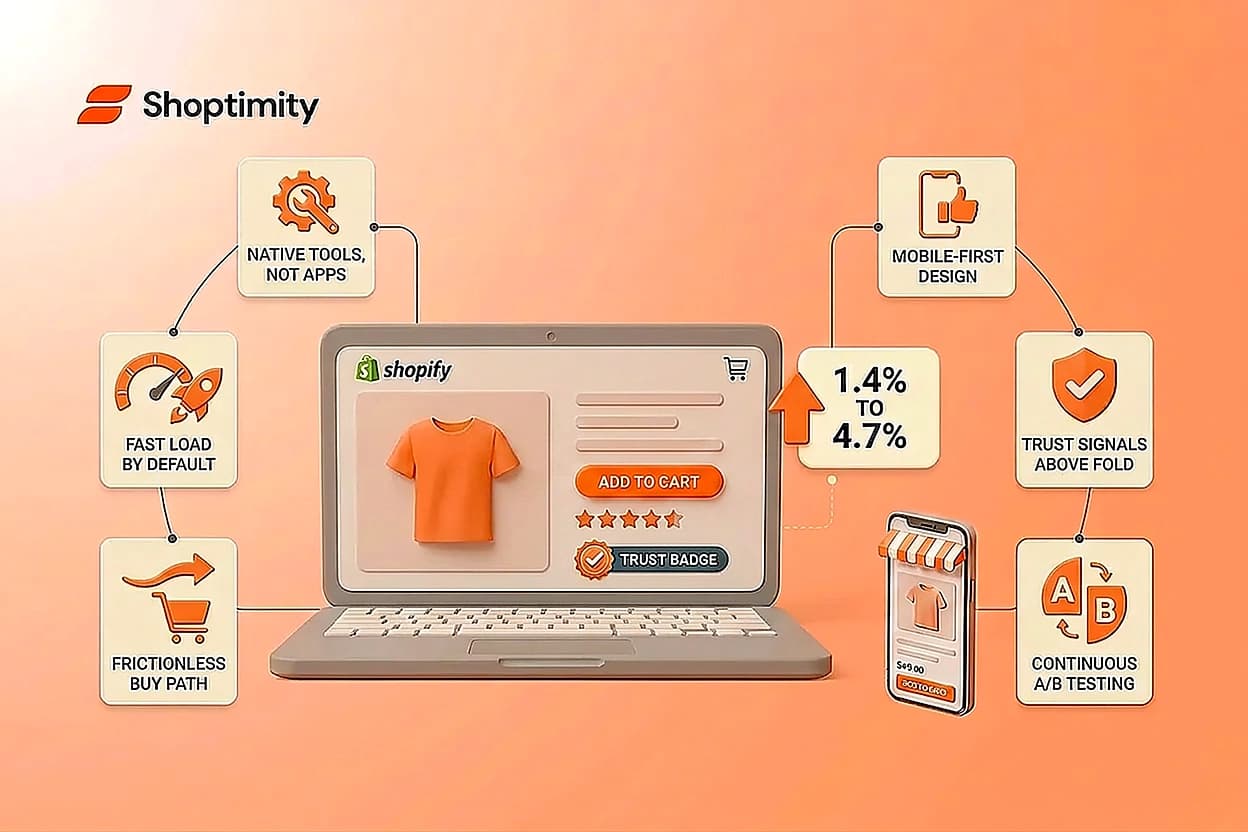
The gap between an average Shopify store and a top-performing one isn't luck or traffic budget. It's a set of deliberate decisions baked into the store's foundation from day one.
The numbers tell the story. The average Shopify store converts at 1.4%, while top 10% performers exceed 4.7%. That's a three-fold difference in revenue from the exact same traffic. A store designed for conversion doesn't just look good. It removes friction at every step, moves visitors toward purchase, and builds trust before they even reach checkout.
TL;DR: Top Shopify stores designed for conversion share three traits: they're built on conversion-focused themes with native optimization tools, they test relentlessly using A/B testing, and they prioritize mobile experience where most of their friction lives.
What Does "Designed for Conversion" Actually Mean on Shopify?
A Shopify store designed for conversion is purpose-built to turn browsers into buyers. It's not about flashy design or trendy layouts. It's about architecture.
Conversion-focused design means:
- Native optimization tools, not app stacks. Every added app slows your site and costs monthly fees. Stores designed for conversion have sticky add-to-cart buttons, trust signals, quantity breaks, and upsell logic built directly into the theme. No third-party apps needed.
- Speed that doesn't bleed ad budget. Conversion drops measurably with every extra second of load time. On paid traffic, a slow store burns money directly. A conversion-designed store loads fast by default and keeps JavaScript minimal.
- A buy path with no dead ends. Product pages that guide visitors toward purchase, checkout flows that don't ask for unnecessary information, and upsell moments positioned after, not interrupting, the main sale.
- Mobile-first, not desktop-first. Most Shopify traffic comes from mobile, but desktop still converts higher. A store designed for conversion acknowledges this gap and bridges it, not ignores it.
This is different from a beautiful theme. Beautiful doesn't convert. Intentional does.
Why Your Store's Conversion Rate Matters More Than Traffic
Most Shopify merchants focus on traffic. It's visible, it's concrete, and it feels productive. But the math exposes why that's wrong.
1,000 visitors at 1.4% conversion = 14 sales. 1,000 visitors at 2.8% conversion = 28 sales.
Same traffic. Double the revenue.
Conversion rate optimization is the highest-ROI lever in your business. You already paid for that traffic through ads, email, or content. Converting more of it is pure margin.
A Shopify store that moved from the 1.4% average to the 4.7% top-10% mark saw roughly a three-fold increase in revenue from the exact same visitor pool. No new customers. No higher ad spend. Just better conversion.
The merchant who spends $5,000 on paid traffic but ignores conversion rate is flushing money away. The merchant who spends $5,000 on traffic AND optimizes conversion doesn't just win, they own the niche.
Shopify Conversion Rate Optimization Trends in 2026
Three shifts define how stores designed for conversion actually work in 2026.
AI-driven personalization and first-party data. The cookieless era forces a reckoning: you can no longer rely on third-party tracking. Top stores are building with first-party data, email, browsing history on their own site, customer behavior. They use that data to personalize product recommendations, checkout messaging, and post-purchase upsells. It's not magic. It's intentional.
Mobile parity, finally. Desktop still outpaces mobile by nearly 60% in conversion rate (1.9% vs. 1.2%), but that gap is closing. One-tap wallets like Shop Pay and Apple Pay have smoothed mobile checkout friction dramatically. Stores designed for conversion now treat mobile not as an afterthought, but as the primary customer journey. If your mobile conversion rate isn't moving toward parity with desktop, your store isn't optimized.
Native testing, not third-party apps. Shopify introduced Rollouts in Winter '26, a native A/B testing tool built directly into the admin. You can now test theme changes, scheduled releases, and rollbacks without installing any external tool. It's server-side, so it doesn't slow your store. And it removes friction: no app subscriptions, no integration headaches, just testing. This opens up testing for every merchant, because the cost barrier is gone.
Native A/B Testing and Theme Rollouts: How to Test Without Risk
For years, Shopify merchants relied on third-party apps to test anything. Rollouts changes that.
Here's what Rollouts does: you create a variant of your live theme, control what percentage of visitors see it (say, 20% traffic split), and measure the impact before rolling out to everyone. You can schedule the rollout for a specific date, and if results go wrong, you can rollback automatically.
The payoff: you test without risk. A bad checkout flow? You catch it on 20% of traffic before it tanks your store. A new product page layout? Test it live against your control before committing.
Most merchants never tested before because the app cost didn't justify small tests. With Rollouts built-in, the math flips. You now test everything because the friction is gone.
Start with high-impact tests: checkout flow simplification, call-to-action wording, product page layout, trust signal placement. Each test should run for at least 2-4 weeks to gather statistical significance. Stores that run structured A/B tests outperform those that don't, often by 2-3x.
One caution: scheduling theme changes through Rollouts works on Basic and up, but running an actual traffic-split experiment with analytics requires the Advanced plan or higher. Check your plan before assuming you have access.
The Mobile-First Reality That Changes Everything
Here's the uncomfortable truth: mobile traffic represents the bulk of your visitors, but mobile conversion still lags desktop by a meaningful margin. This gap is your biggest opportunity.
Different research samples put the exact gap at different sizes — one dataset puts tablet and desktop around 3.1% conversion versus 2.9% on mobile, a narrower gap than the 1.9%-vs-1.2% figure cited above. The absolute numbers vary by sample, but the direction is consistent across sources: mobile converts lower than desktop. And since 70% of your traffic is mobile, even a small per-visit gap compounds into real revenue left on the table at scale.
Stores designed for conversion don't fight this. They lean into it:
- Reduce mobile checkout fields. Remove fields that don't matter. Require only email, address, and payment. Use Shop Pay or Apple Pay as the primary option.
- Make buttons bigger. Tap targets should be at least 48 pixels. Your "Add to Cart" button should dominate the fold on mobile, not hide below three sections of copy.
- Load images intelligently. High-resolution product images are crucial, but lazy-loading them prevents mobile pages from bloating and slowing down.
- Trust signals move higher. On mobile, show reviews and social proof above the fold. Don't bury them in a tab. Visitors on mobile have shorter attention spans; earn trust fast.
Conversion-focused themes like Shoptimity's Fashion theme build mobile-first from the start, with dedicated mobile navigation, filters, and product layouts that don't feel squeezed. Speed scores matter here too: a mobile-first theme built on Online Store 2.0 with clean code will load faster and convert higher than a theme ported to mobile as an afterthought.
You now know what separates a 1.4% converter from a 4.7% performer. The difference isn't traffic or luck. It's deliberate choices: a theme built for conversion, native tools that don't slow you down, mobile-first design, and continuous testing.
Ready to build a store actually designed for conversion? Start with Shoptimity, it includes 30+ native conversion tools, mobile-first design, and A/B testing blocks, all at $19/month. Test it free for 7 days, no credit card charge until day 8. If it's not right, cancel anytime.
Build Your Conversion-Optimized Store Today
You now know what separates 1.4% converters from 4.7% performers. Start with a theme actually designed for conversion, not just aesthetics. Shoptimity includes 30+ native conversion tools—no apps, no extra cost, and 7 days free to test.
7-day free trial · all themes included · cancel anytime
Continue Reading
Shoptimized Shopify Theme: What Changed in 2026 (And What to Know Before Buying)
For years, Shoptimized was the default pick for anyone building a high-ticket dropshipping store. A ...

Top Shopify Theme for Wholesale: A 2026 Buyer's Guide
You've just spent weeks sourcing inventory and building supplier relationships. But when you launch ...
What Makes a Shopify Store Best Converting: The 2026 Framework for High-Ticket Dropshippers
The difference between a best converting Shopify store and an average one isn't traffic or luck, it'...