
How to Build High Performance Stores on Shopify in 2026
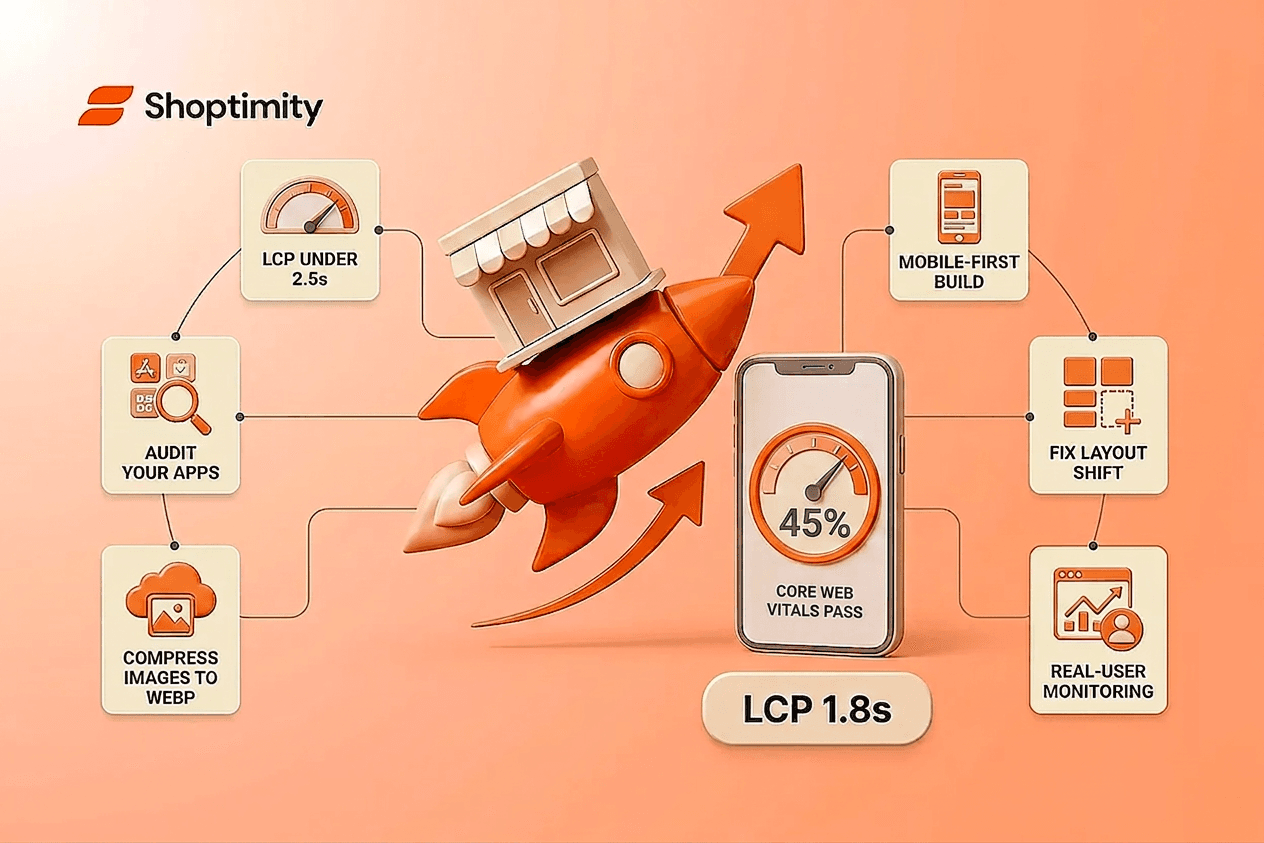
A 0.1-second speed gain lifts sales by 8.4%. If your Shopify store loads in 4 seconds on mobile instead of 2, you're leaving money on the table with every visitor. High performance stores aren't a luxury anymore, they're the baseline for staying competitive in 2026.
Most Shopify merchants are still running slow. The average conversion rate sits at 1.4%, but stores optimized for speed and performance routinely exceed 3.2%. The difference isn't magic. It's intentional architecture, measurement, and relentless testing.
Key takeaways:
- High performance stores convert at 2x+ the rate of average Shopify stores
- Largest Contentful Paint (LCP) must stay under 2.5 seconds on mobile to avoid search penalties
- 45% of Shopify stores pass all Core Web Vitals; the rest are losing sales to slowness
- Apps and legacy code are the #1 culprit slowing down stores
- Real-user measurement is more valuable than synthetic PageSpeed tests
What Are High Performance Stores?
High performance stores are Shopify storefronts built with speed, user experience, and conversion as first-class constraints from day one. They load fast, feel responsive, and turn visitors into buyers at measurable rates.
In 2026, a high performance store hits these benchmarks:
- Largest Contentful Paint (LCP) under 2.5 seconds on mobile
- Conversion rates above 3%, with top performers exceeding 4.7%
- 45% or better Core Web Vitals pass rate
- Cart abandonment below 45%
- Mobile-first architecture (since 70%+ of traffic now lands on phones)
The term isn't about raw horsepower. It's about intentional decisions: choosing themes built for speed over feature bloat, removing apps that inject render-blocking code, compressing assets before upload, and measuring real-user performance, not just synthetic tests.
Why Store Speed Impacts Your Bottom Line
You already know slow stores leak revenue. Here's why it matters more in 2026:
A premium trail mix brand saw visitors bounce before adding items to cart. After a redesign focused on speed and clarity, they achieved 200% sales growth. Another eco-friendly apparel store cut cart abandonment from 75% to 30% by optimizing performance alongside UX.
Those aren't outliers. Across 30 million Shopify sessions, the data is clear: every 0.1-second speed gain lifts sales by 8.4%. A pet nutrition brand saw 5x growth in online orders after modernizing their storefront with performance optimization at the core.
Speed affects three critical metrics:
- Bounce rate: Visitors abandon before the page fully loads.
- Conversion rate: Users who stay longer and experience smooth interactions buy more often.
- Search ranking: Google's Core Web Vitals are now a ranking factor. Slow stores rank lower and receive less organic traffic.
For scaling brands, this compounds. A 15% conversion lift isn't trivial; it's the difference between profitability and bleeding money on ads.
Shopify Performance Optimization Essentials
Building high performance stores requires tackling the real bottlenecks. Here's where most stores fail and how to win:
Remove Apps That Bloat Your Store
Apps are the #1 performance killer. Each one injects JavaScript, blocks rendering, and delays page load. A common mistake: installing an app to solve a problem, then forgetting about it.
Audit your apps ruthlessly. Uninstall anything you haven't actively used in the last 30 days. Better yet, choose a theme with native features built in. When your theme includes quantity breaks, upsells, and product quick views natively, you eliminate render-blocking overhead entirely.
Compress and Optimize Images
Largest Contentful Paint measures how fast your main visible content appears. The ideal LCP is 1.8 to 2.0 seconds. You must keep it below 2.5 seconds to avoid search penalties.
Compress all images before uploading. Use WebP format when possible. Remove lazy loading from above-the-fold images so they display immediately. Lazy loading is great for products at the bottom of the page, but it delays your hero image and tanks LCP.
Switch to a Performance-First Theme
Your theme sets the performance ceiling for your entire store. A bloated theme loaded with animations and heavy JavaScript starts you off behind. Shopify's own Dawn theme is the industry's reference point for this: it's built with Core Web Vitals in mind and scores consistently high on independent tests.
When evaluating themes, check their PageSpeed Insights score on mobile. If it's below 50, move on. A high-converting, performance-first theme gives you a clean foundation to build on.
Enable HTTP/3 and Optimize Asset Delivery
HTTP/3 delivers faster, more reliable connections, especially on mobile. Organize your assets properly for better caching. One merchant reduced average page load time by 40% after optimizing CDN and asset delivery, then saw a 15% boost in conversion rates from international customers alone.
Define Image Dimensions to Fix Layout Shift
Cumulative Layout Shift (CLS) tracks visual stability. Define explicit height and width dimensions for all images and ad banners before they load. This reserves the right amount of space and prevents the layout from jumping around as content appears.
Shopify Web Performance Reports: Your Measurement Foundation
You can't improve what you don't measure. Most merchants only test on a fast desktop connection, missing the real problem: how it performs for the majority of visitors on mobile.
Shopify's Web Performance reports give you real-user data aggregated across your homepage, product pages, and collection pages simultaneously. Unlike PageSpeed Insights, this is actual performance from real visitors. The data comes from Real User Monitoring (RUM) and reflects the true experience.
Check your reports at least monthly. Look past the big score number. Review the raw metrics: LCP, Cumulative Layout Shift (CLS), and INP. Mobile and desktop often perform very differently.
Learn how to fix your Shopify Core Web Vitals and optimize LCP with a step-by-step audit process that identifies your specific bottlenecks before you change anything.
High Performance Benchmarks for 2026
The 2026 data reveals what's working:
Conversion benchmarks: The average Shopify conversion rate is 1.4%. Top performers exceed 3.2%. Elite stores break 4.7%.
Core Web Vitals adoption: 45% of Shopify stores pass all Core Web Vitals, a modest gain over the web-wide average of 40%. This means the majority are failing at least one metric and losing sales as a result.
Mobile dominance: With 70% of e-commerce traffic on mobile, a mobile-first approach isn't optional. Stores that optimize for mobile first see faster speeds and higher conversions.
Apps trend: Progressive elimination of app stacks in favor of all-in-one themes with native features. This shift rewards themes built natively on Shopify Online Store 2.0 with sections everywhere.
Real-user metrics win: Real-user data from Shopify's Web Performance reports predicts revenue impact better than synthetic tests. Prioritize RUM over PageSpeed Insights.
High performance stores aren't built by accident. They result from intentional measurement, ruthless prioritization, and choosing tools that reward speed over feature bloat.
Start with your baseline: run a Shopify Web Performance report and a PageSpeed audit on your top three pages. Identify your biggest bottleneck, usually apps or images. Fix that first. Then measure again.
The stores that move fastest in 2026 are the ones that load the fastest and convert the most visitors into paying customers.
Transform Your Store Into a Revenue Engine
Now that you know which performance metrics matter, the next step is actually implementing them. Get access to a high-performance Shopify theme built with speed and conversion in mind, plus 30+ native tools that replace expensive apps. Star
7-day free trial · all themes included · cancel anytime
Continue Reading
Shopify B2B Company Locations: Give Buyers the Right Access
Configure Shopify B2B company locations, verify buyer permissions and test pricing, addresses and pa...
Shopify Checkout Contact Settings: Separate Email From Shipping Phone
Configure Shopify checkout contact settings and test email, phone and shipping address requirements ...
Shopify POS Recent Carts: Share a Sale Without Reserving Stock
Learn how Shopify POS recent carts work across devices, what they do not reserve, and how to hand of...