
Mobile First Design for E-Commerce: Why Your Shopify Store's Conversion Rate Depends On It
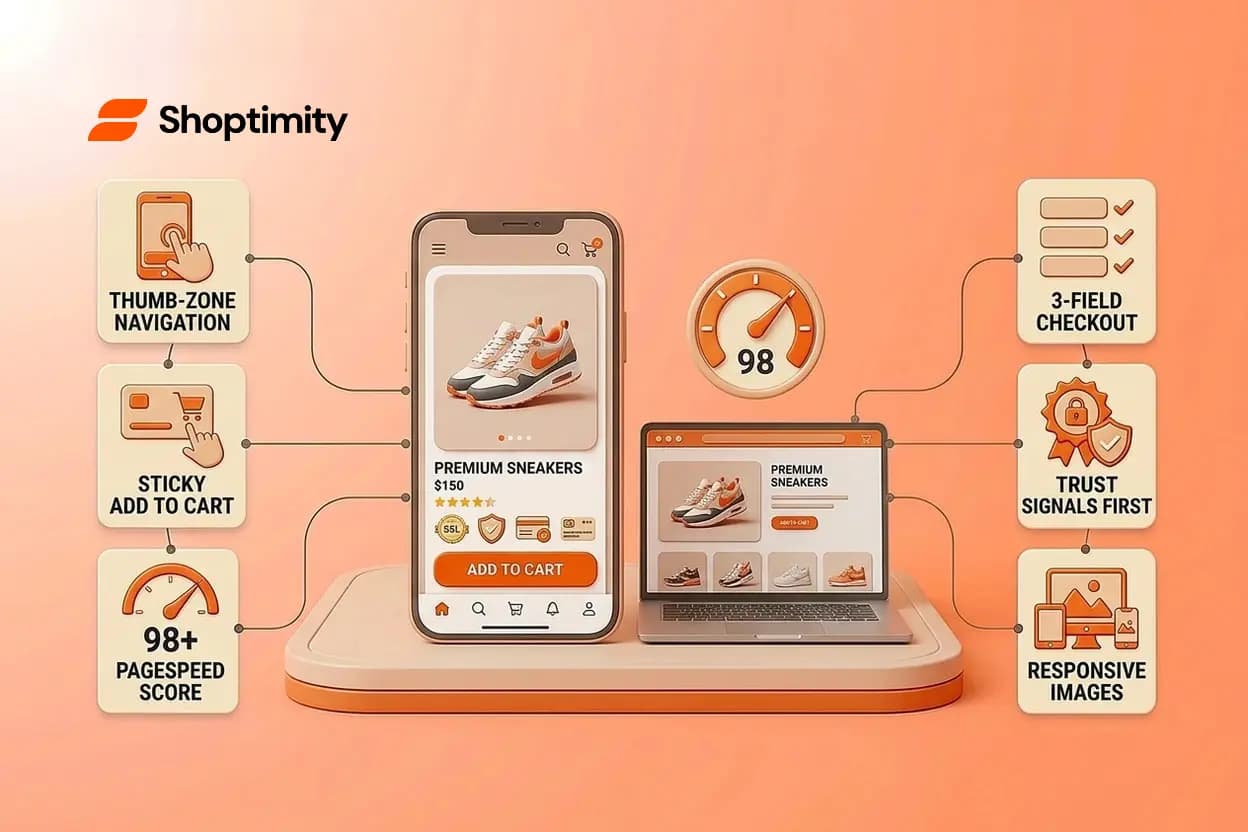
This approach isn't a nice-to-have in 2026, it's the difference between a store that sells and one that bleeds money to bounce rates. If you're running a high-ticket or scaling e-commerce brand on Shopify, 74% of your traffic is already on mobile devices. Yet most merchants still build for desktop and shrink the result down, leaving phone shoppers frustrated, abandoned carts piling up, and revenue on the table.
TL;DR:
- Mobile first design prioritizes smartphone experience before scaling to desktop, not the reverse
- 74% of e-commerce traffic now comes from mobile; it still converts lower than desktop due to poor UX
- Core optimizations: thumb-friendly buttons, fast load times, simplified checkout, sticky carts, and trust signals above the fold
- Real-world result: merchants upgrading to true mobile-focused themes see conversion rate increases of 1.4% to 4.7%
- Implementation starts with your theme architecture; heavy, desktop-first code kills mobile speed and conversions
What Is This Approach?
Mobile first design philosophy builds the layout for the smallest screen first, then progressively enhances it for larger displays. The distinction matters.
Responsive design shrinks a desktop page to fit a phone. This approach is architected for touch, thumb-reach, and slow networks from day one. The code loads mobile assets first and defers heavy scripts. Navigation and buttons are sized for fingers, not mice. Forms are simplified. Images load intelligently.
According to industry research, global mobile commerce sales are hitting new highs in 2026. For dropshippers and brand builders selling premium products, this means the phone is your storefront. Design for it first or lose the sale.
Why This Matters for Your Bottom Line
The gap between mobile and desktop conversions is narrower than it used to be, but it still exists. Data shows mobile conversion rates landing around 2.9% versus 3.1% on desktop and tablet. Since 70% of your traffic is mobile, that small gap compounds into real revenue loss at scale.
Speed is your biggest lever. Every second of mobile load time costs roughly 7% in conversions. A high-ticket jewelry store with $5,000 average order value loses thousands when a page takes four seconds to load on a 4G connection.
Mobile first design also improves SEO. Search engines now index mobile-first and reward fast, mobile-friendly sites with better rankings. For a scaling brand competing for organic visibility, speed and UX are search ranking signals.
The real payoff: merchants audited across thousands of stores who switched to mobile-focused themes reported conversion rate lifts ranging from 1.4% to 4.7%. That's not incremental, that's transformative.
Core Principles of Effective Implementation
Thumb-Zone Navigation
Mobile users navigate with their thumb, usually one-handed, while distracted. Your menu should live at the bottom of the screen, not the top. Critical buttons (Add to Cart, Checkout, Search) must be in the thumb-safe zone: between the middle and lower third of the screen.
Sticky bottom navigation and expandable menus keep users from scrolling back to the top to add a product or find categories. This is the difference between frictionless and frustrating.
Load Speed That Doesn't Compromise
Page speed on mobile is non-negotiable. Compress images aggressively, load high-resolution product photos only when needed (lazy-loading), and minimize JavaScript. Themes built natively on lightweight architectures achieve 98+ speed scores, meaning pages render in under two seconds on 4G.
Slow load times kill conversions. Fast load times also reduce server costs and improve SEO.
Simplified Checkout
Mobile checkout should be ruthless about reducing fields. Require only email, address, and payment method. Offer Apple Pay and Shop Pay as primary options to bypass form friction. Address autocomplete via Google Maps removes typing errors and speeds entry.
A three-field checkout on mobile converts higher than a ten-field desktop checkout, even if both capture the same data.
Trust Signals Above the Fold
On mobile, attention is scarce. Product reviews, social proof, and security badges should appear immediately after product images, not buried in a tab. A customer browsing on their phone has seconds to decide. Earn their trust in the first 500 pixels or lose them.
Responsive Images and Adaptive Layouts
A single large image file built for desktop destroys mobile load time. True mobile first design uses responsive images that serve the correct resolution for each device. Your Shopify theme should automatically adjust layouts to single-column grids on phones, multi-column on tablets, and full displays on desktop.
Horizontal scrolling on mobile is a conversion killer. Eliminate it entirely.
Common Mistakes That Kill Conversions
Building for Desktop First, Then Shrinking
The worst mistake is not prioritizing smartphones at all. Themes ported from desktop to mobile feel squeezed. Navigation doesn't work intuitively. Images and buttons are undersized. Load times suffer because desktop code bloat doesn't compress well.
Oversized Popups and Intrusive Elements
Mobile popups are faster to close on desktop. A popup that covers 60% of the screen on a phone creates immediate friction. If you must use popups for emails or offers, make them easy to dismiss and keep them to the lower half of the screen.
Ignoring Load Time on Cellular Networks
Many merchants test speed on WiFi or fast home connections. Real customers are on cellular networks, which are slower and more variable. If your page doesn't load in under three seconds on 4G, you're leaving conversions on the table.
Forms That Are Too Long
A mobile buyer doesn't want to fill out unnecessary fields. Asking for shipping notes, gift messages, or secondary contact info before they've bought anything adds friction. Simplify at checkout; save optional fields for post-purchase or account settings.
How to Implement This on Your Shopify Store
Audit Your Current Theme
Check your store's mobile speed using Google PageSpeed Insights. If your mobile score is under 80, your theme is likely built desktop-first. A truly optimized theme achieves scores in the 90s, meaning fast load times and better conversions.
Choose a Smartphone-Optimized Theme From the Start
Don't patch a desktop theme. Start with one architected for mobile. Look for themes that achieve high PageSpeed scores on mobile, typically in the 90s range. If you're looking for flexible, AI-powered customization without code, subscription-based theme platforms deliver continuous improvements and optimization without the one-time purchase expense.
Optimize Checkout Flow
Use Shopify's best practices: numeric keyboards for phone fields, address autocomplete, and guest checkout as the primary path. Test your checkout with real devices and slow network speeds (use Chrome DevTools to throttle to 4G).
Test on Real Devices
Emulators aren't enough. Test on actual phones and tablets your customers use. Scroll, tap buttons, navigate menus. If something feels awkward, it will kill conversions.
Optimize Your Checkout Specifically
Your checkout deserves focused attention. Remove friction with fewer form fields, sticky add-to-cart buttons, and clear progress indicators. A sticky cart button at the bottom of the screen means customers never lose sight of their purchase, even while browsing product details.
===
You now understand why prioritizing smartphone experiences drives revenue. The fastest way to capture those mobile sales is with a theme built from the ground up for smaller screens, not squeezed down from desktop. Try Shoptimity free for 7 days, no credit card required until day 8, and see your mobile conversion rate climb. Start your free trial.
Continue Reading

Top Shopify Theme for Wholesale: A 2026 Buyer's Guide
You've just spent weeks sourcing inventory and building supplier relationships. But when you launch ...

What Makes a Shopify Store Best Converting: The 2026 Framework for High-Ticket Dropshippers
The difference between a best converting Shopify store and an average one isn't traffic or luck, it'...
The Right Dropshipping Shopify Theme Saves You Thousands in Wasted Ad Spend
When a cold visitor lands on your dropshipping store, they have seconds to decide if you're legitima...