
Built for Mobile-First: Responsive Design in Shoptimity
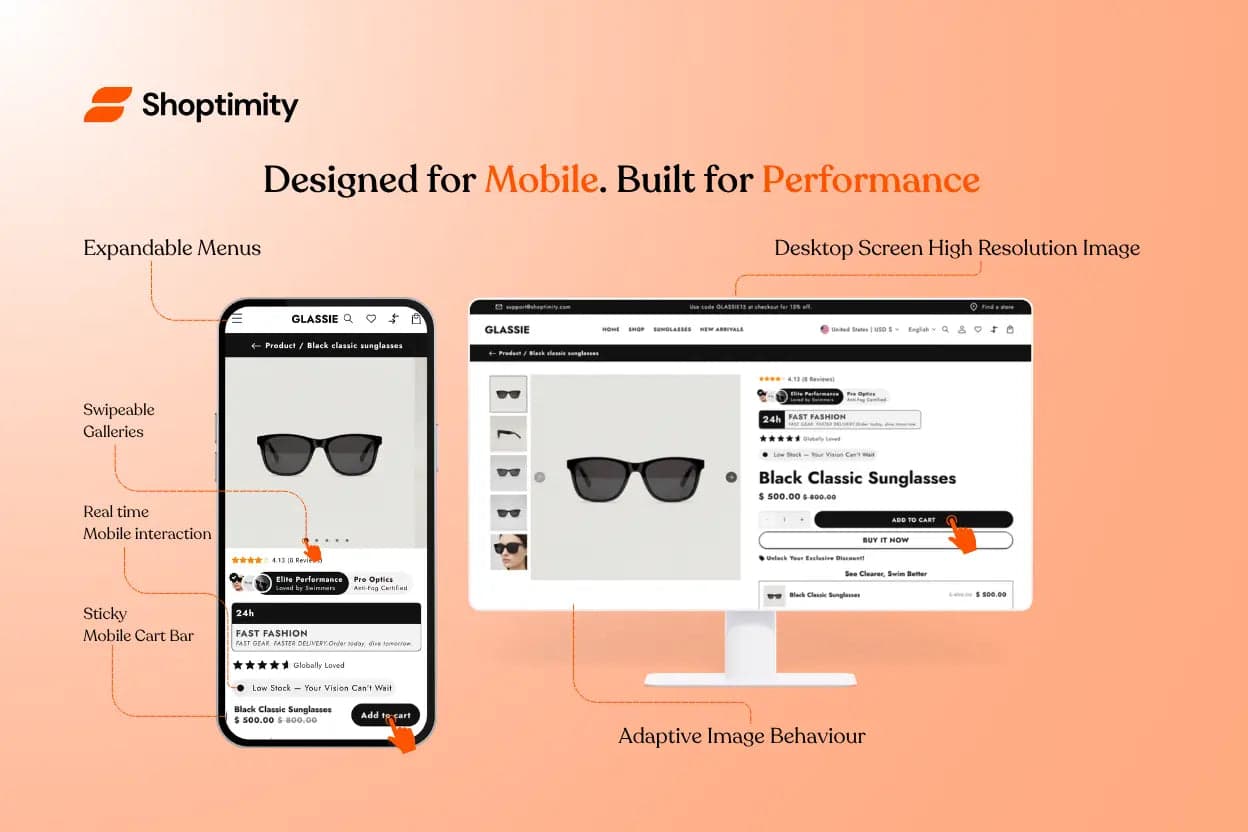
More people shop on mobile than ever before. A mobile-first design is essential — and Shoptimity delivers, built with mobile responsiveness and usability as a priority.
Why Mobile Matters
Mobile devices have different needs than desktop: smaller screens, touch navigation, and often slower network connections. Shoptimity's layout and elements are optimised for exactly these conditions:
- Buttons and links are large enough for easy tapping.
- The fluid design adjusts to tablets and smaller phones — no horizontal scrolling.
- Mobile shoppers see a simplified menu and collapsible sections.
- Product pages stay clean and easy to scan.
Adaptive Sections and Images
Shoptimity uses adaptive (responsive) images that load the right size for each device. High-resolution images are reserved for desktop and large screens, while smaller files load on phones — saving data and speeding up loading on mobile networks.
Touch-Friendly Interactions
Shoptimity goes beyond layout to improve how people interact on touch devices:
👆 Swipeable galleries
Product image galleries support swipe gestures, so customers browse photos with a finger.
🛒 Sticky mobile cart bar
A compact cart button stays fixed at the bottom of the screen, making it easy to add to cart without scrolling up.
☰ Expandable menus
Navigation collapses into a hamburger icon on mobile — saving space while keeping fast access to categories.
These choices mean mobile visitors aren't frustrated by elements designed only for desktop. Shoptimity treats mobile first, ensuring a smooth experience.
Improved Conversions on Mobile
A seamless mobile experience directly influences sales. When shoppers can easily tap to buy and see clear calls-to-action, conversion rates go up. Shoptimity maintains all of its conversion features on smaller screens — upsell popups, countdown timers, and more — adapted for touch.
The result is an optimised conversion funnel, no matter what device a customer uses.
Win the customers shopping on their phones
A genuinely mobile-first theme — adaptive images, touch-friendly interactions, and every conversion feature built to work on the small screen.
$19/month or $160/year (save 30%) — 7-day free trial, no hidden charges.
Continue Reading

Shopify Themes With Product Filtering
Give a shopper 200 products and no filters, and most will leave before finding what they want. Give ...

Shopify Themes With Mega Menu: What to Look For
A mega menu can turn a big catalog into an easy browse — or a wall of links nobody reads. The differ...
How to Speed Up a Shopify Store: The 2026 Checklist
Quick answer: most slow Shopify stores share the same four problems, in this order: oversized images...