
The 80+ Widgets Every Shopify Store Actually Needs
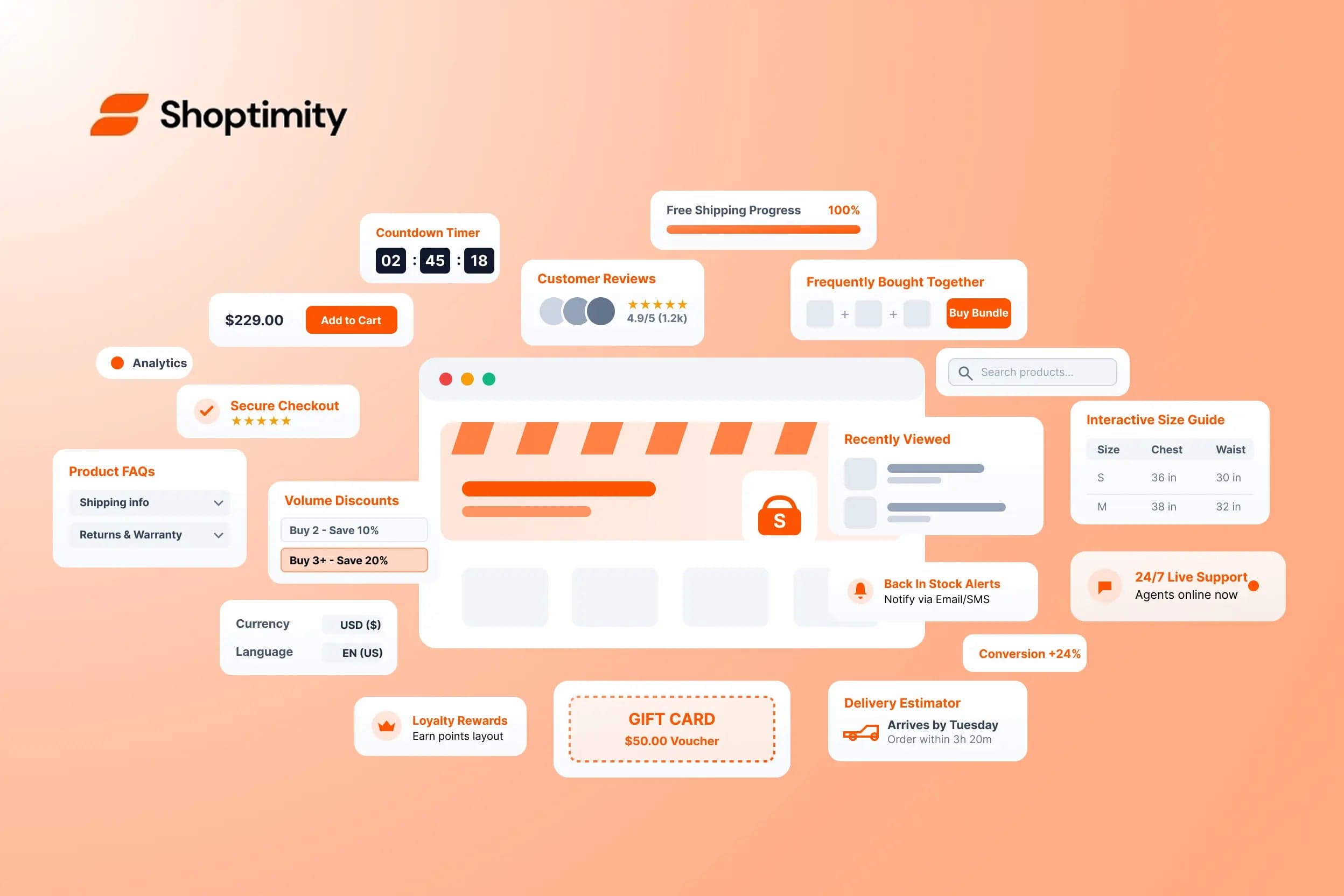
Quick confession: most Shopify themes ship with 10–25 widgets, and store owners end up installing 5–10 apps to fill the gaps. Each app costs $10–30/month — so the total climbs to $50–300/month for what should have been included with the theme.
This guide is different. We'll lay out the essential widgets every Shopify store actually uses in 2026, organised by what they do — and show you how Shoptimity bundles 120+ of them into one subscription rather than ten separate apps.
What Counts as a "Widget"?
A widget is a functional block you drop into a page. Not just a section, not just a layout — a tool that does something:
- Show a countdown timer to a sale.
- Display a "Only 3 left!" stock counter.
- Embed an Instagram feed.
- Add a "recently viewed" product carousel.
- Collect custom FAQ answers on a product page.
Sections are about layout (image banner, slideshow, rich text). Widgets are about function (countdown timer, reviews, FAQ). The best Shopify themes give you both.
The Essential Widgets, Organised by Category
Here are the widgets every store leans on, grouped by what they do — all part of Shoptimity's 120+ library.
Conversion Boosters
15 widgetsThe highest-ROI widgets — every store should have them.
- Countdown timer — drives urgency before a sale ends.
- Stock counter — "Only 3 left!" creates scarcity.
- Free shipping bar — shows how close customers are to free shipping.
- Product bundle widget — "Frequently bought together" carousels.
- Volume discount table — "Buy 2 get 10% off" pricing.
- Cart upsell — recommends add-ons at checkout.
- BOGO widget — "Buy one, get one" promo displays.
- Save vs. retail — strike-through pricing displays.
- Trust badges row — SSL, secure checkout, money-back icons.
- Recently viewed products — brings shoppers back to reconsider.
- Size guide popup — reduces returns on apparel.
- Back-in-stock notification — captures emails when items return.
- Wishlist / save for later — encourages return visits.
- Loyalty program widget — points and rewards on product pages.
- Gift wrap option — especially valuable in Q4.
Social Proof
10 widgets- Customer reviews — star ratings and written reviews.
- Photo reviews — customer-submitted photos.
- Testimonial slider — quotes with avatars.
- Press logos row — "As seen in" media mentions.
- Influencer / UGC gallery — shoppable Instagram content.
- Verified buyer badge — confirms review authenticity.
- Video testimonials — embedded customer videos.
- Expert endorsements — industry quotes and certifications.
- Net promoter score — live satisfaction metric.
- Real-time purchase popups — "Sarah from NY just bought X."
Content & Storytelling
12 widgets- Custom FAQ accordion — per product or per page.
- Comparison table — product vs. product specs.
- Story block — brand story with rich media.
- Lookbook gallery — editorial image spreads.
- Video hero section — auto-playing brand videos.
- Press / media widget — recent articles about your brand.
- Brand values row — mission-driven messaging.
- Founder story block — personal narrative.
- Sustainability widget — eco credentials.
- Ingredients / materials list — transparency for CPG brands.
- Size chart widget — visual size guides.
- Custom fields display — show unique product attributes.
Navigation & Discovery
10 widgets- Mega menu — multi-column navigation with images.
- Collection list with images — visual category browser.
- Search bar with suggestions — predictive search.
- Filter sidebar — price, colour, size, material filters.
- Quick view popup — product details without leaving the page.
- Breadcrumbs — where am I in the site?
- Sticky add-to-cart — follows scroll on mobile.
- Collection featured products — highlight bestsellers per category.
- Recently viewed products — last 5–10 items browsed.
- Related products — "You may also like" carousels.
Engagement & Lead Capture
10 widgets- Newsletter popup — email capture with discount.
- Exit-intent popup — last-chance offer before leaving.
- Spin-to-win wheel — gamified email capture.
- Quiz / product finder — "Find your perfect X" interactive.
- SMS signup — phone number capture.
- Birthday club — capture birthdates for personalised offers.
- Refer-a-friend block — word-of-mouth program.
- Survey widget — quick customer feedback.
- Poll / vote widget — engagement and insights.
- Live chat widget — real-time customer support.
Information & Utility
10 widgets- Shipping estimator — cost by zip code on the product page.
- Delivery date widget — "Get it by X date" countdown.
- Store locator — physical retail locations.
- Currency switcher — multi-currency support.
- Language switcher — multi-language stores.
- Age verification popup — for age-gated products.
- Cookie consent banner — GDPR / privacy compliance.
- Returns policy block — easy returns info on product pages.
- Wholesale pricing tier display — B2B pricing.
- Care instructions block — how to care for the product.
Advanced / Niche
10+ widgets- 3D product viewer — rotate and inspect products.
- AR "try at home" — augmented-reality placement.
- Custom configurator — build-your-own product.
- Subscription widget — subscribe & save interface.
- Pre-order widget — reserve upcoming products.
- Waitlist widget — join the queue for sold-out items.
- Gift card widget — digital gift card sales.
- Donation widget — round-up for charity at checkout.
- Appointment booking — for service-based stores.
- Custom engraving input — personalisation at purchase.
- Sample request widget — try-before-you-buy programs.
- Live inventory feed — real-time stock across locations.
- Multi-vendor widget — marketplace functionality.
How Most Stores Get These Widgets (The Expensive Way)
Here's the typical setup at a "mature" Shopify store paying for separate apps:
How to Get Them All for $19/Month
Shoptimity bundles 120+ widgets — including everything on the list above — into a single $19/month theme subscription (or $160/year — about $13/month). No upsells, no "premium tier," no per-widget fees, and new widgets are added monthly.
That's the entire list — conversion, social proof, storytelling, navigation, lead capture, utility, and advanced — for less than the cost of a single one of the apps above.
How to Choose Which Widgets You Actually Need
You don't need all of them at once. Here's the priority order:
🚀 Tier 1 — install day one
Countdown timer, stock counter, free shipping bar, trust badges, reviews widget, newsletter popup, mega menu, and related products.
📈 Tier 2 — install in month one
Product bundles, size guide popup, recently viewed, wishlist, custom FAQ, and search bar with suggestions.
⚙️ Tier 3 — add as you scale
Quiz / product finder, subscription widget, loyalty program, SMS signup, and UGC gallery.
Start with Tier 1. Add Tier 2 as you grow. Reach for Tier 3 when you have specific business needs.
Frequently Asked Questions
All 120+ widgets in one subscription
Stop stacking apps. Get every widget on this list — conversion, social proof, navigation, lead capture, and more — built into one theme.
$19/month, or $160/year (about $13/month) — 7-day free trial, no hidden charges.
Continue Reading
How to Scale Conversions with an AI Shopify Theme Store Builder
Seventy percent of retail executives plan to implement artificial intelligence tools in 2024 to stay...
How to Fix Core Web Vitals on Shopify for Faster Speeds
You spend months perfecting product photos, collection layouts, and checkout flows. Yet, many ecomme...
Shopify Subscription Themes vs One-Time Purchases
Store owners often spend hundreds of dollars a month on app subscriptions, theme updates, and develo...