
What Is Shopify? How It Works, Step by Step
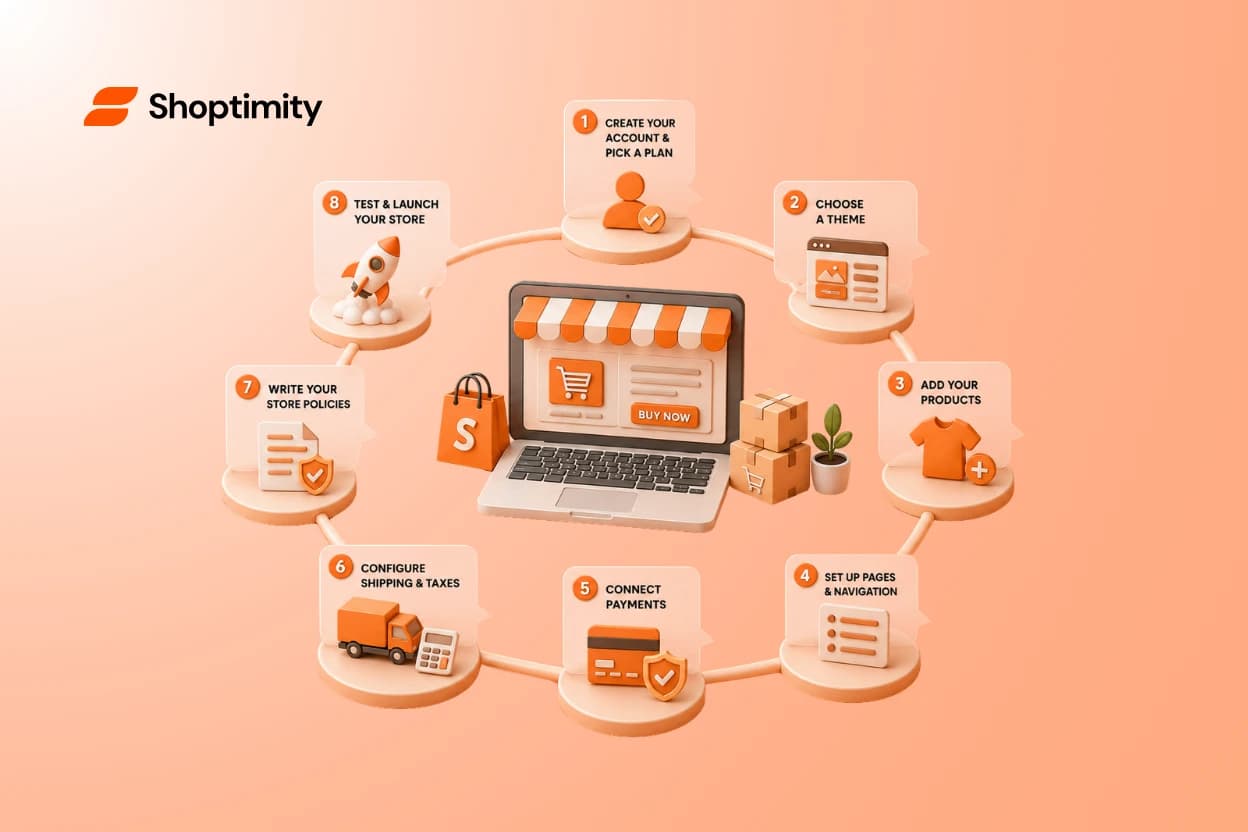
Shopify is an e-commerce platform that lets you build and run an online store without writing code. It handles the parts that used to require a developer — hosting, checkout, payments, security — so you can focus on products and customers. Sign up, and Shopify hands you a working storefront in minutes. What happens between "I signed up" and "I'm actually open for business" is where most beginners get stuck, and that's what this guide walks through.
What Is Shopify, Exactly?
Shopify is a subscription-based platform that provides everything you need to sell online: a website builder, a shopping cart, a payment processor, and order management tools, all in one place. You don't host it yourself, you don't manage a server, and you don't need to know how to code. You pick a plan, get a store, and start adding products.
Think of it less like a piece of software you install and more like renting a fully-equipped storefront in a mall that also runs your cash register, tracks your inventory, and mails your receipts.
How Shopify Works: What Actually Happens After You Sign Up
Here's the part most "what is Shopify" articles skip. Signing up gets you a blank store — not a finished one. Below is the real sequence, in the order most first-time owners go through it.
Step 1: Create Your Account and Pick a Plan
You enter an email, a store name, and basic business details. Shopify gives you a default ".myshopify.com" address immediately, which you'll later swap for your real domain. Plans mostly differ in transaction fees, staff accounts, and reporting — not in what you're able to build.
Step 2: Choose a Theme (and Why It's Not the Finish Line)
This is the step most beginners assume is "building the store." It isn't — it's picking the shell. A theme controls layout, fonts, colors, and how products display, but an empty theme with no products, no navigation, and no payment setup still isn't a store a customer can buy from.
Lesson we see over and over: new merchants spend days comparing themes, then rush the product pages, shipping rules, and checkout flow — the parts that actually decide whether someone buys. A theme sets the stage; it doesn't write the play. If you want a head start here, browse conversion-ready Shopify themes comes with the built-in cart, upsell, and review tools most stores otherwise bolt on later with separate apps.
Step 3: Add Your Products
Each product needs a title, description, price, images, and inventory count. If you're selling variants — size, color, material — you set those up here too. This is also where you decide on collections, which is how products get grouped for browsing (think "New Arrivals" or "Under $50").
Step 4: Set Up Navigation and Pages
Your menu, your homepage, your About and Contact pages — none of this exists by default. A customer landing on your store needs an obvious path: browse, find, understand, buy. Skipping this step is why some new stores technically "work" but nobody can figure out how to shop them.
Step 5: Connect Payments
You'll activate a payment provider — Shopify Payments if it's available in your country, or a third-party gateway if not — so customers can actually check out with a card, digital wallet, or buy-now-pay-later option. Without this connected and verified, your "Buy" button doesn't work, no matter how good your theme looks.
Step 6: Configure Shipping and Taxes
You set shipping zones, rates (flat, weight-based, or free-over-a-threshold), and let Shopify calculate tax based on where you're registered to collect it. This step is easy to underestimate, and it's one of the most common reasons launches get delayed — merchants realize mid-setup they haven't decided how shipping actually works.
Step 7: Write Your Store Policies
Refund policy, shipping policy, privacy policy, terms of service. Shopify can generate templates for these, but you still need to review and customize them. Beyond legal cover, they answer the questions that make a stranger trust you enough to enter their card number.
Step 8: Test the Full Buying Journey Before You Launch
Walk through your own store as a customer would: land on the homepage, find a product, add to cart, check out, get the confirmation email. Do this on both desktop and mobile before you announce anything.
Pre-launch checklist:
- Test checkout with a real (or Shopify's test) payment
- Confirm shipping rates display correctly at checkout
- Check every menu link and product page on mobile
- Read your policies as if you're a first-time visitor
- Remove the password/coming-soon page when ready
What Can You Actually Do With Shopify?
Beyond the basics of listing and selling products, Shopify supports:
- Selling physical products, digital downloads, or services
- Running discounts, gift cards, and abandoned-cart follow-ups
- Managing inventory across multiple locations
- Selling on Instagram, TikTok, and marketplaces from the same product catalog
- Adding apps for reviews, upsells, subscriptions, and loyalty — or using a theme that already includes them
According to Shopify's own platform overview , the platform now powers millions of merchants across more than 175 countries, which is part of why so many apps and themes are built specifically to plug into it.
The Mistake First-Time Owners Make Most
Treating theme selection as the main event. A polished theme on a store with no clear navigation, vague shipping info, or an untested checkout will still lose sales. The theme is what a visitor sees first — it's not what makes them buy.
"The store isn't ready when it looks finished. It's ready when a stranger can find a product, understand the price, trust the checkout, and complete the purchase without asking you a question."
This is also where speed and mobile performance quietly matter more than most beginners expect — a slow theme can undo good product and pricing decisions before a customer even sees them. If you'd rather not stitch together separate apps for cart, upsells, and reviews on top of a slow default theme, see how Shoptimity themes handle this out of the box for a sense of what's included at each step above.
What You Need Before You Start
- A business name and, ideally, a domain (you can buy one through Shopify or elsewhere)
- Product photos and descriptions — even rough drafts are fine to start
- A way to accept payments (most merchants use Shopify Payments where available)
- A shipping plan: what you charge, and where you'll ship
- Basic policies: refunds, shipping, privacy
You don't need all of this perfected on day one. You need it decided enough that a real customer isn't left guessing.
Shopify in Plain Terms
So, what is Shopify? It's the infrastructure of an online store — hosting, checkout, payments, and product management — wrapped in an interface you don't need to be a developer to use. How Shopify works, in practice, is a sequence: account, theme, products, navigation, payments, shipping, policies, and testing. Skip a step, and the store looks done before it actually is.
If you're comparing your options before you commit to a theme, read a real store setup walkthrough or check common setup questions for the details that don't fit in a general overview like this one.
Ready to see how far a theme can take you before you touch a single app?
Start a 7-day free trial of Shoptimity and set up your first Shopify store with conversion tools already built in — no card charge until day 8, cancel anytime.
7-day free trial · all themes included · cancel anytime
Continue Reading
What Makes a Shopify Store Best Converting: The 2026 Framework for High-Ticket Dropshippers
The difference between a best converting Shopify store and an average one isn't traffic or luck, it'...
How Much Does It Cost to Create an Online Store in 2026?
The price to start an online store ranges wildly: anywhere from under $100 to $250,000 or more. But ...
How to Make Extra Money Online by Building Shopify Themes
Shopify theme builders pull five figures a year, some much more. If you can code, design, or blend b...